Agent actions: SMS and transfers
An agent can do more than talk. It can text a link to a contact who says yes, text the contacts it could not reach, and put a caller through to a person on your team. Set these actions in the Tools tab of the agent. Each action has an Enabled check box. Click Save changes to save the tab.
Actions are prompt-driven. The agent uses an action only when the prompt tells it when to use it. If an action is off, the agent cannot use it, even if the prompt asks for it.
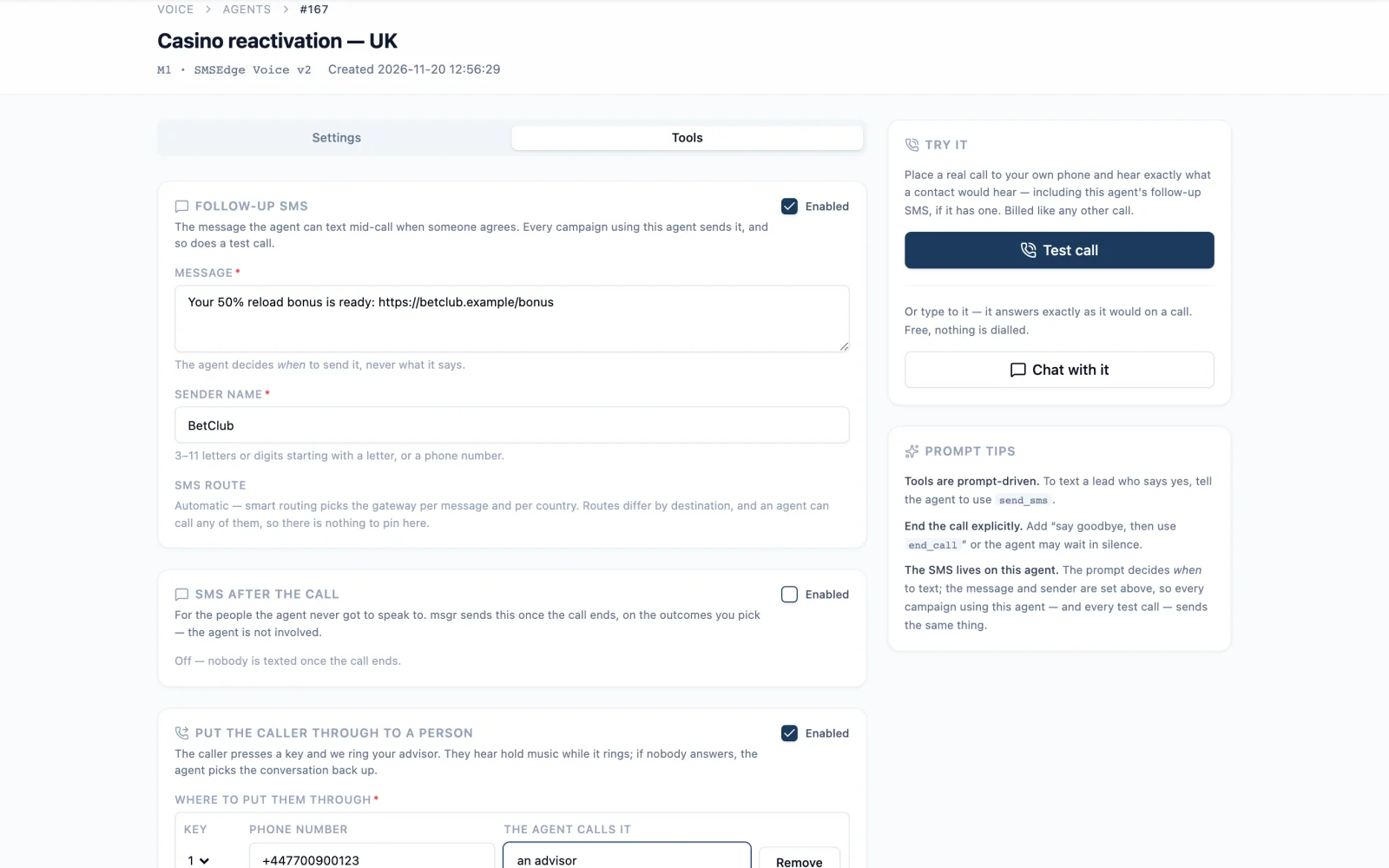
Follow-up SMS during the call
The agent texts this message during the call, for example when the contact agrees to get a link.
- Turn on Follow-up SMS.
- Type the Message. The agent decides when to send it, never what it says.
- Type the Sender name: 3 to 11 letters or digits that start with a letter, or a phone number.
- Add a line to the prompt, for example:
When the customer agrees, use send_sms to text them the link.
The SMS route is automatic: smart routing selects the best route for each message and country. Every campaign that uses this agent sends the same message, and so does a test call.
SMS after the call
This message is for the contacts that the agent did not talk to, for example when the call goes to voicemail or nobody answers. The platform sends it when the call ends. The agent is not part of it.
- Turn on SMS after the call.
- Under Send after these outcomes, select the call outcomes that get the SMS, for example Voicemail and No answer.
- Type the Message and the Sender name.
A contact gets one SMS per call only. If the agent already sent the follow-up SMS during the call, the contact does not get a second one.
Put the caller through to a person
The caller presses a key and the platform rings your advisor. The caller hears hold music while it rings. If nobody answers, the agent continues the conversation.
- Turn on Put the caller through to a person.
- Under Where to put them through, set one row for each destination:
- Key: the key the caller presses (1–9, 0, * or #).
- Phone number: the full international number, starting with + (for example
+447700900123). - The agent calls it: the name the agent uses, for example an advisor or the sales team (max. 64 characters).
- To add more destinations, click Add a destination.
- Optional: select a Hangup key. When the caller presses it, the call ends. It cannot be the same key as a destination.
- Set Ring the advisor for (10 to 120 seconds, default 30).
- Tell the agent in the prompt when to offer the transfer and which key to press.
End the call
The agent ends a call with the end_call action. This action is always available. Add a line to the prompt such as Say goodbye, then use end_call. If you do not, the agent can wait in silence until the contact hangs up or the call reaches the Max call length.
Test the actions
In the text chat, the agent shows each action as a label, for example Would send the follow-up SMS or Would transfer to an advisor. Nothing is sent in the chat. A test call does the real action: the follow-up SMS goes to your phone, and you pay for it. See Test your agent.
Need more help? Contact support.