Authenticate your sender domain
Gmail and Yahoo require bulk senders to authenticate their domain. Add the domain of your From address and publish the DNS records that the platform shows. Your emails are then signed with DKIM, and SPF and DMARC tell the mailbox providers that your servers may send for your domain.
Add your domain
- Go to Email > Senders > Domains.
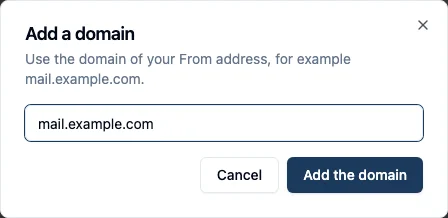
- Click Add a domain.
- Type the domain of your From address, for example
yourshop.comormail.yourshop.com. - Click Add the domain. The domain page opens with the DNS records.
Publish the DNS records
- Log in to the DNS host of your domain (for example Cloudflare, GoDaddy or your registrar).
- Add each record of the table: the same Type, Host and Value. Copy each value with its Copy button.
- Go back to the domain page and click Check DNS again.
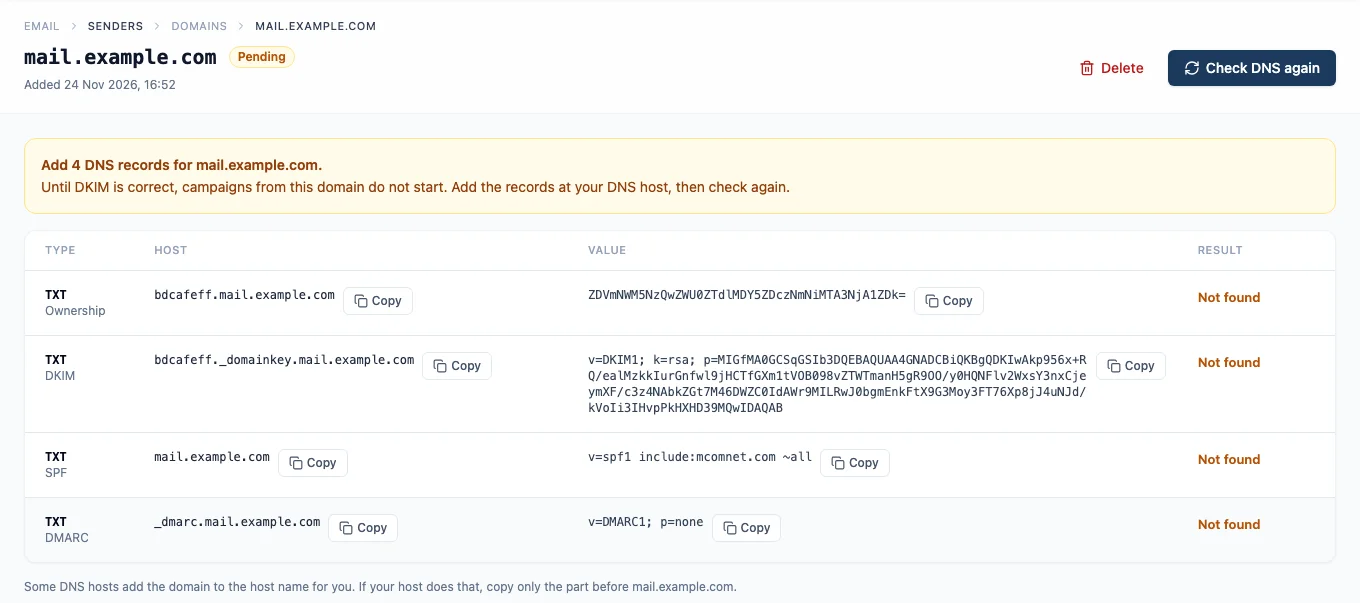
The Result column shows the state of each record:
| Result | Meaning |
|---|---|
| Pass | The record is published with the correct value. |
| Not found | The record is not published yet. DNS changes can take up to 48 hours. |
| Wrong value | A record exists, but with another value. Replace it with the value from the table. |
Some DNS hosts add the domain to the host name for you. If your host does that, copy only the part of the host before your domain.
What each record does
| Record | Purpose |
|---|---|
| Ownership (TXT) | Proves that the domain is yours. |
| SPF (TXT) | Lists the servers that may send email for your domain. The table shows your own SMTP servers that send from this domain (a: + the server's host name). It shows Pass when your SPF record allows at least one of them. |
| DKIM (TXT) | A public key. Every email from the domain is signed with the matching private key, so the receiver knows the email was not changed. |
| DMARC (TXT) | Tells the receiver what to do with emails that fail SPF and DKIM. Gmail and Yahoo require a DMARC record for bulk senders. |
Until the DKIM record shows Pass, emails from this domain are not signed with its key. Campaigns still send, but Gmail and Yahoo require DKIM from bulk senders. Add the records before your first campaign.
Your domain already has an SPF record? Do not add a second one. Add the a: part of the table to your existing SPF record, before ~all. A domain may have only 1 SPF record.
Need more help? Contact support.